Finding Winning Products with Best Sellers in Fiidom AI Dropship
Picking products that already sell well is one of the fastest ways to build a successful dropshipping store. The Best Sellers tab in Fiidom AI Dropship shows you top-selling products on AliExpress, already checked for quality and shipping, so you can spend less time searching and more time selling.
Open Best Sellers
In your Shopify admin, go to Apps > Fiidom AI Dropship > Find Product. Best Sellers is the tab that opens by default.
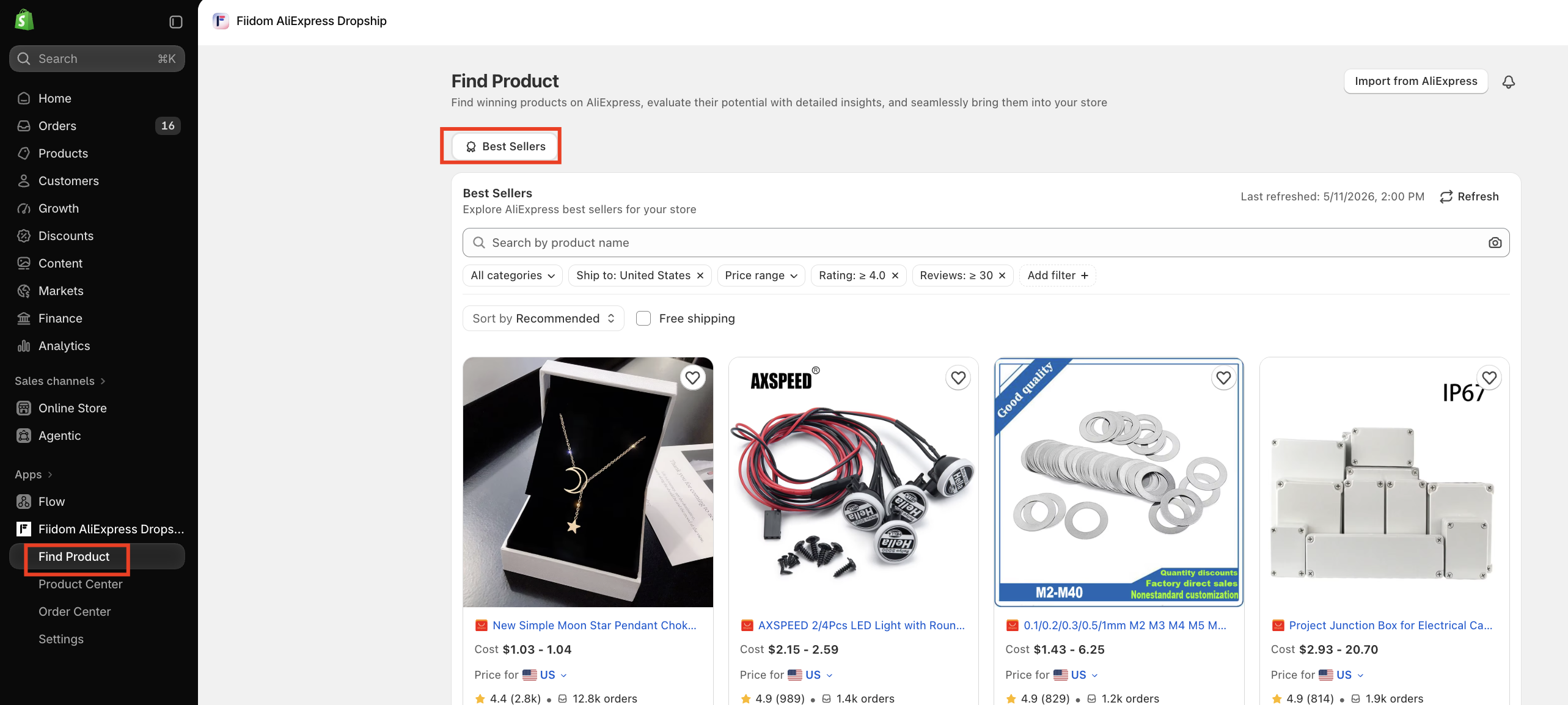
Find Product helps you find winning products on AliExpress, check their potential, and bring them into your store. You can also use Import from AliExpress in the top right to import a product by its link, and the bell icon to see your notifications.
Each time you open a tab, Fiidom loads the latest products that match its criteria.
How products are chosen
Best Sellers starts with AliExpress's top-selling products across all categories, then filters them so you only see products that are a good fit for dropshipping. By default, a product is shown only if it:
- Meets your rating filter (4.0 or higher by default)
- Has at least 30 reviews
- Is available to order
- Ships to your selected market
- Delivers within 15 days

The products that pass are then ranked by sales performance, rating and reviews, delivery time, and shipping cost, so the strongest options appear first.
Search and filter
Search
Type a product name into the search bar, or click the camera icon to search by image.
Filters
Use the filters under the search bar to narrow the list:
| Filter | Options | Default |
|---|---|---|
| Category | Select one or more categories | All categories |
| Ship to | The country you're shipping to | Your main market, for example United States |
| Price range | Preset price ranges | Any price |
| Rating | Any rating, 4.0 and up, 4.5 and up | 4.0 and up |
| Reviews | All reviews, 30 or more | 30 or more |
Active filters appear as chips, such as Ship to: United States or Rating: ≥ 4.0. Click the x on a chip to remove that filter.
Click Add filter for more options:
- Product order count
- Product analysis
- Ship from
- Wishlist: all products, wishlist only, or products not in your wishlist
Refresh
Click Refresh to reload the product list with the latest data. Your current filters and sort stay the same. The Last refreshed time next to the button shows when the list was last updated.
Sort the results
Use Sort by to change the order of products:
- Recommended (default): ranks products by sales performance first, then rating and reviews, delivery time, and shipping cost.
- Rating: high to low.
- Reviews: high to low.
- Price: low to high, or high to low.
- Wishlist: shows the products you've saved.
Next to Sort by, tick Free shipping to show only products that ship free to your selected market. It's off by default.
Shipping availability, cost, and delivery time are all checked against the country in your Ship to filter.
Read a product card
Each product card shows the key details you need to decide quickly:
- Product name and image
- Cost: your purchase price. Products with several variants show a range, such as $9.99 to $19.99.
- Rating and reviews, plus the number of orders
- Price for: the destination country. Click it to check the product for a different country.
- Estimated delivery time to that country
Save and import products
- Wishlist: click the heart icon to save a product. To see your saved products later, sort by Wishlist or use the Wishlist filter.
- Push to store: add the product to your Shopify store.
The list keeps loading more products as you scroll.
How product data stays fast and up to date
- Quick loading: Fiidom keeps recent product details and shipping information on hand, so Find Product opens quickly without reloading everything from AliExpress each time.
- Shipping by market: shipping costs and delivery times are saved for each destination country, so switching Ship to stays fast.
- No duplicates: if a product appears in more than one AliExpress source, you'll only see it once.
- Always available: if AliExpress changes or retires one of its product sources, Best Sellers keeps working with the sources that remain.
- Clear status messages: you'll see a loading state while products load, a message if no products match your filters, and an error message if something goes wrong. If nothing matches, try loosening your filters, such as widening the price range or choosing all categories.
Should you need any further information, please do not hesitate to contact us directly at [email protected]