Find Discounted AliExpress Products with Deals
The Deals tab on the Find Product page shows AliExpress products that are on sale right now. Every product in this tab has a real discount on AliExpress and has passed quality and shipping checks, so it's ready for dropshipping.
Use Deals to find products you can buy at a lower cost. A lower cost means a bigger profit margin, or room to run your own promotions.
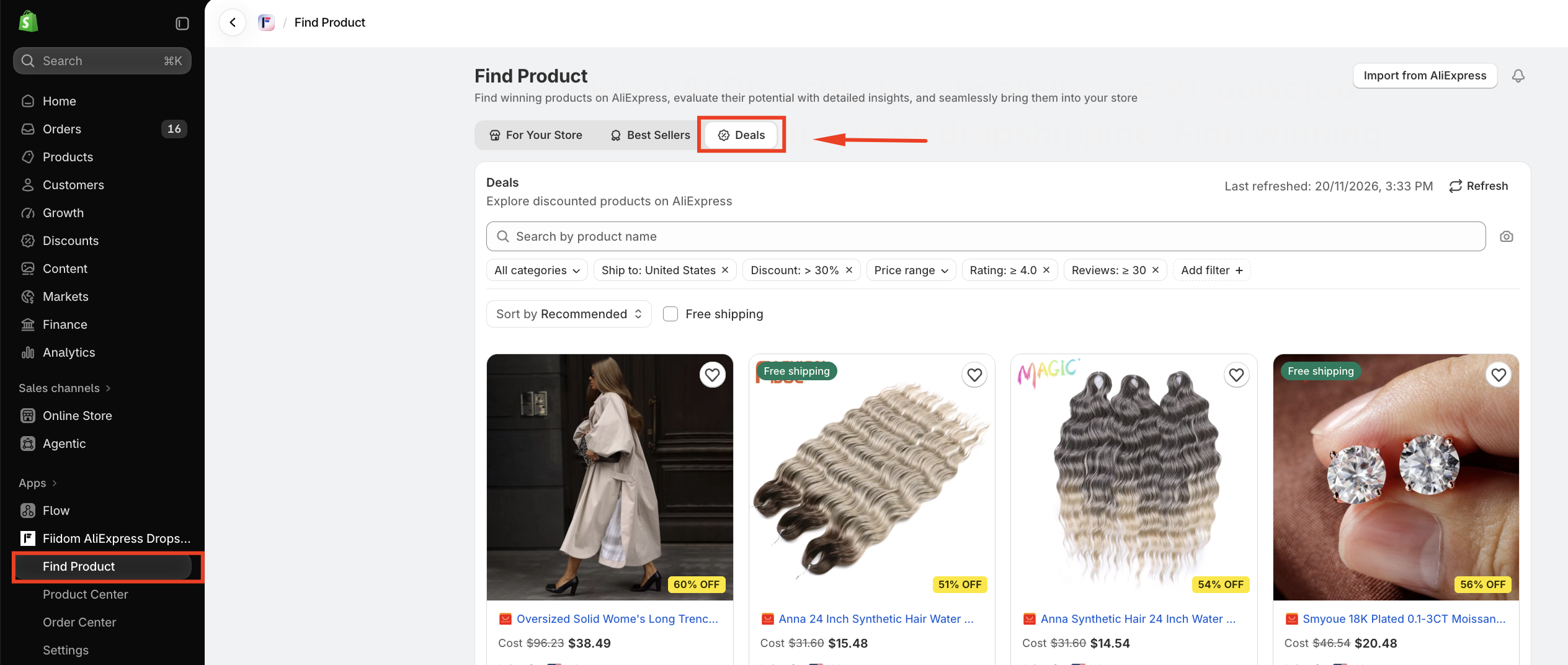
Where to find Deals
- From your Shopify admin, open Fiidom AI Dropship.
- Go to Find Product.
- Select the Deals tab.
How products are chosen for Deals
Deals are picked from AliExpress top sellers across all categories. A product appears in Deals when both of the following are true:
- Its sale price is lower than its original price.
- The discount is at least 15%.
The app also checks each product's quality and whether it can ship to the country selected in Ship to. Products without a valid original price and sale price aren't included.
Note: Discounts come from AliExpress and can change or end at any time. Check the cost again before you push a product to your store or place an order.
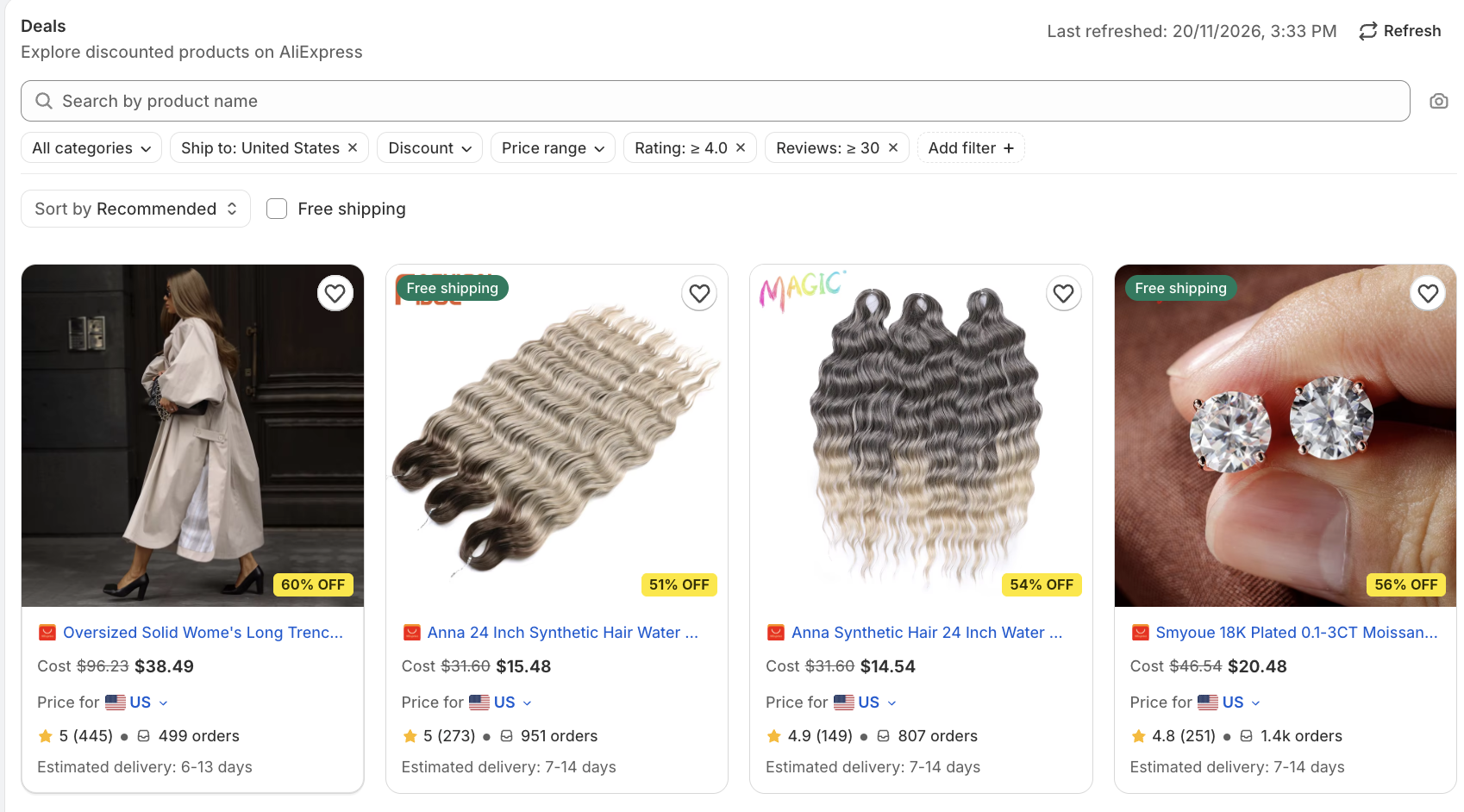
What you see on each product card
- Product image and name
- % OFF badge on the product image, for example 60% OFF. If a product's variants have different discounts, the badge shows the biggest one.
- Cost: the original price crossed out, followed by the sale price, for example
$96.23$38.49. For products with several variants, a price range is shown. - Price for: the destination country used for cost and delivery. Click the country to change it.
- Rating, number of reviews, and number of orders
- Estimated delivery time
- A Free shipping label when the product ships free to your selected country
- Heart icon to save the product to your wishlist
Open a product to see its details and push it to your store. More products load as you scroll down.
Search, filter, and sort deals
Search
Use the Search by product name bar to find a specific product. You can also click the camera icon to search by image.
Filters
Use the filters below the search bar to narrow down the list:
- Category: show products from one or more categories.
- Ship to: choose the country you ship to. Shipping cost, delivery time, and free shipping are checked for this country.
- Discount: choose how big the discount is:
- All discounts
- 30% or less
- More than 30% up to 50% (selected by default)
- More than 50%
- Price range: show products in a specific price range.
- Rating: show products with a minimum rating, for example ≥ 4.0.
- Reviews: show products with a minimum number of reviews, for example ≥ 30.
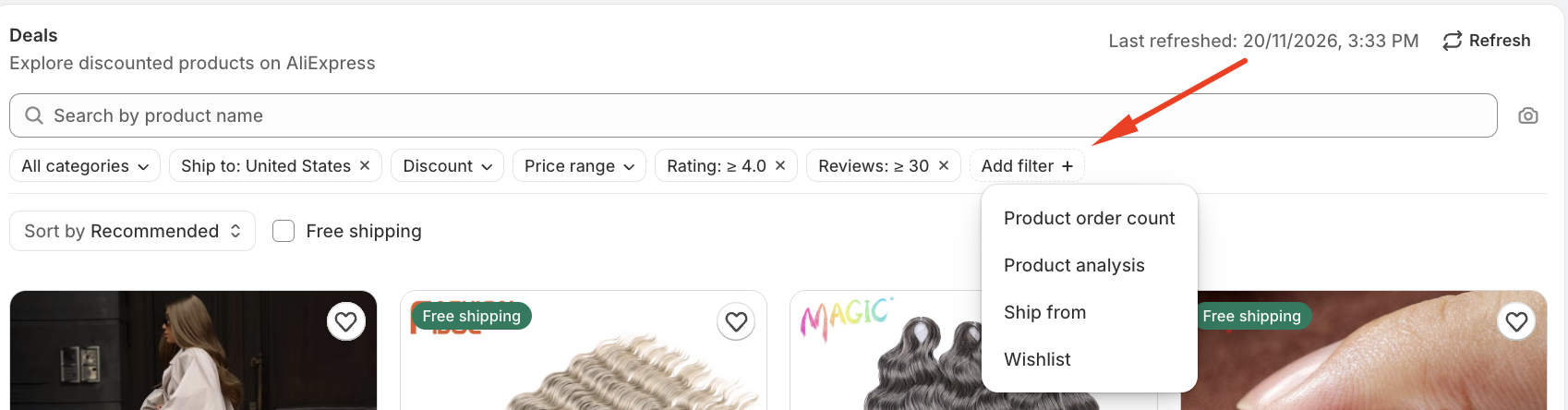
- Add filter: add more filters, such as order count, product analysis, ship from, and wishlist (all products, wishlist only, or not in wishlist).
To remove a filter, click the × next to it.
Sort
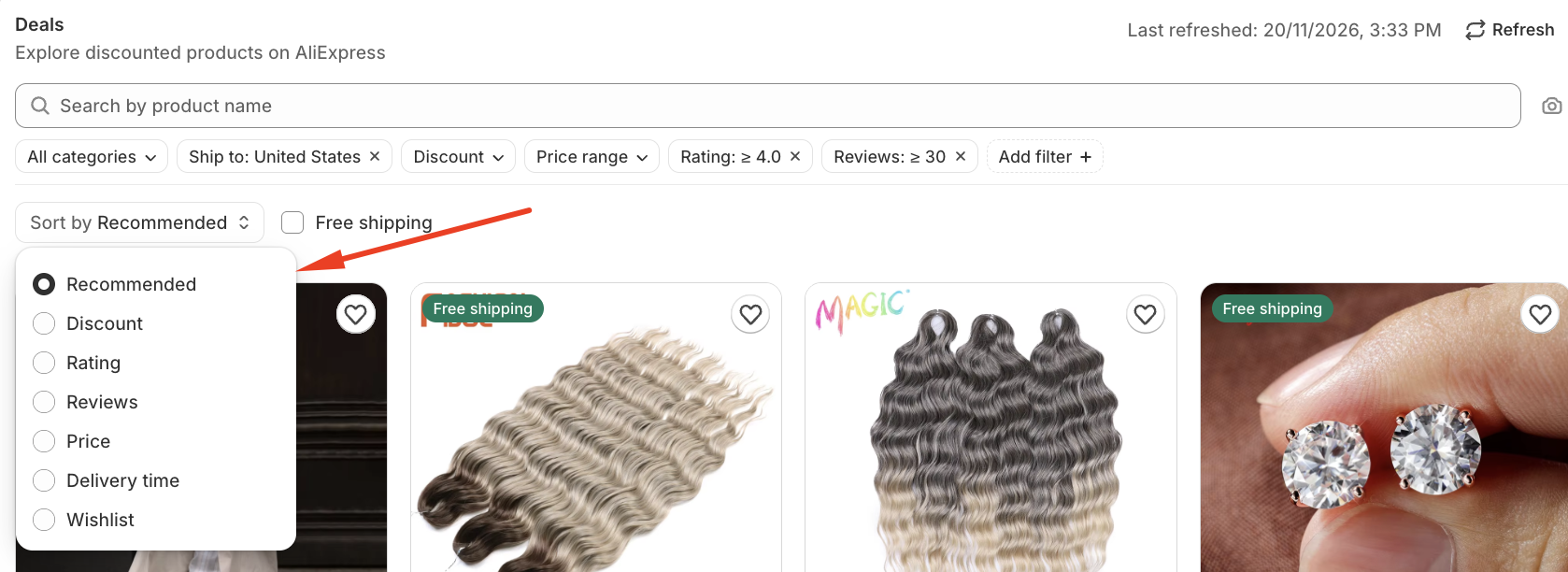
By default, deals are sorted by Recommended. This order looks at the following, in this order:
- Discount
- Rating and reviews
- Delivery time
- Shipping cost
You can also sort by:
- Biggest discount: largest discounts first. This option is only available in the Deals tab.
- Rating: High to Low
- Reviews: High to Low
- Price: Low to High
- Price: High to Low
- Wishlist: shows the products you saved to your wishlist
Select the Free shipping checkbox to show only products that ship free to your selected country.
Refresh the list
The Last refreshed time in the top-right corner shows when the list was last updated. Because discounts change often, click Refresh to load the latest deals.
Refreshing keeps your current filters and sort order.
Save deals to your wishlist
Click the heart icon on any product card to save it. To see your saved products later, do one of the following:
- Sort the list by Wishlist.
- Click Add filter and filter by Wishlist.
Tips for finding good deals
- Don't pick by discount alone. Combine the Discount filter with Rating and Reviews to find discounted products that customers also like.
- Check delivery time. A big discount isn't worth it if delivery to your market is too slow. Set Ship to to your main market first.
- Use Free shipping to keep your total cost low.
- Refresh often. AliExpress deals start and end frequently.
- Plan your prices with sale end dates in mind. If a deal ends, your product cost goes back up, so leave enough margin in your selling price.
FAQ
Are the products in Deals personalized for my store?
No. Deals shows discounted top sellers from all categories. For recommendations based on your store's categories, market, and price range, use the For Your Store tab.
What's the smallest discount shown in Deals?
15%. Products with smaller discounts aren't included.
Why do I see only products with 30% to 50% off?
The Discount filter is set to more than 30% up to 50% by default. To see more products, change it to All discounts or click the × to remove it.
A product has several variants. Which discount does the % OFF badge show?
The biggest discount among its variants.
Why is the price different on AliExpress?
AliExpress discounts can change or end at any time. Click Refresh to load the latest prices.
Does a discounted price stay the same after I push the product to my store?
Not necessarily. The discount is set by the AliExpress seller and may end. Check your product cost before you fulfill orders.
Should you need any further information, please do not hesitate to contact us directly at [email protected]